Warning: nerd talk ahead.
UPDATE: nuts, MySpace has discontinued the "Post To MySpace" feature in favor of their dumb "activity streams," so this plug-in doesn't work anymore. FRAK. Check back later to see if I've coded up a solution.
If you use Wordpress and are looking for a way to publish your WP content to your MySpace account, I've written a dead simple plugin that makes it pretty easy. Read on for the gory details. Otherwise, just back away nice and slow-like. Or watch the nice video in the post below this one.
(And yes, I know MySpace totally sucks and is still totally ugly and why are we still supporting MySpace anyway and they're owned by Satan's News Corp. and urf hurf a durf.)
Some backstory:
Until recently, the best way to cross-post items from Wordpress into MySpace was to use Roderick Russell's MySpace Crossposter plugin. Nice work sword-swallower guy! Anyway, as evidenced by the long string of complaints and pleas in the comments over there, Roderick's plugin stopped working as MySpace "redesigned."
I thought I'd be a hero and figure out why the plugin stopped working. But after spending a day untangling the code and the MySpace login process, I was getting nowhere. MySpace is crazy-making, hardened against automated access via scripts, usually involves a CAPTCHA, and most of my attempts ended up here anyway because MySpace requires JavaScript.
But then I did some digging and found that MySpace has an open endpoint for people to re-post any web content to their MySpace account as a blog, bulletin or link item. Perfect! Forget automation, how about we just make it easier than cutting-and-pasting.
So I made a plugin that packages up a Wordpress post and ships it off to MySpace with a single button:

There's no automatic publishing; you still have to log in at least once. But there's something really elegant about the workflow. You get a nice preview, so there's no worrying about your formatting getting mangled in transit:
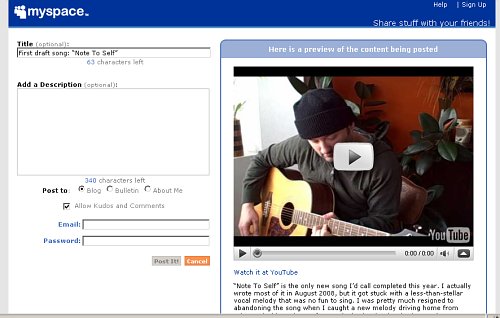
The plugin itself is very brief and hardly rocket surgery, but if you're into hacking Wordpress it's a good example of how to create your own "meta box" menus to the posting/editing pages. Feel free to hack away.
Installation
- Download the plugin here
- Unzip it and toss the post-to-myspace.php file into your /wordpress/wp-content/plugins/ directory
- Log into Wordpress, go to Plugins > Installed, find the "Post To MySpace" plugin in the list and activate it.
Notes
- Not yet tested in WP 2.9
- Posts must be published before they can be cross-posted to MySpace.
- Scheduled posts will not be automatically cross-posted. You have to click the button after they "go live."
- No warranties or fitness for a particular purpose implied. Support requests will be met with quiet, sympathetic looks. Do not taunt Happy Fun Ball.